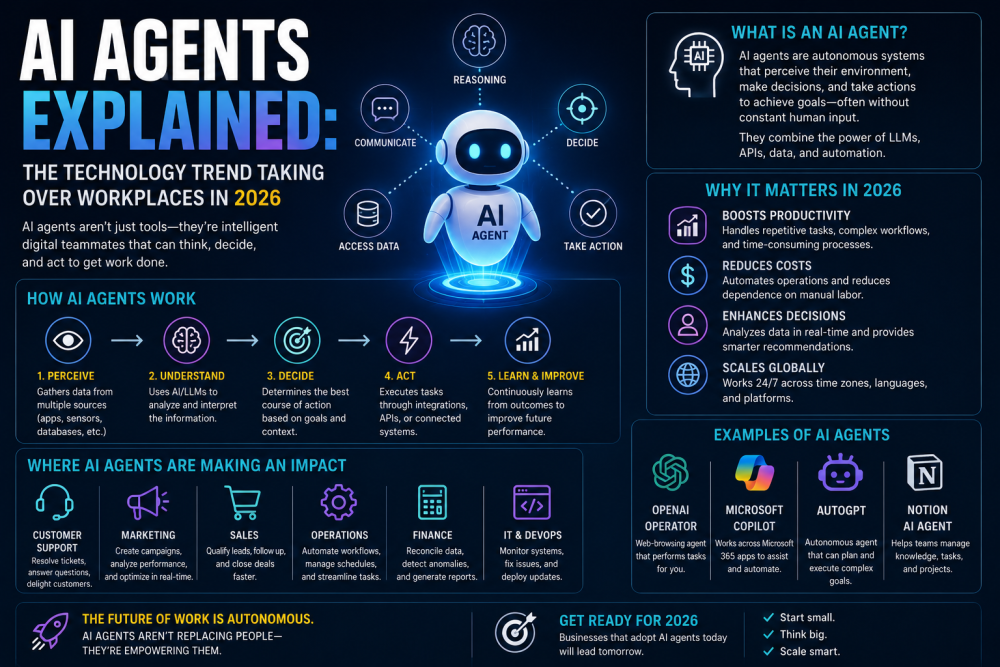
There's a moment that happens to a lot of people when they first see an AI agent actually working. Not a chatbot answering questions—an agent doing things. Clicking through software, reading emails, pulling data from one system and entering it into another, then sending a summary to the right person. It's almost disorienting, because it looks so much like watching someone at their desk, just... without the someone.
That moment—and the mild unease that follows—is probably the clearest way to understand why AI agents have become the most talked-about technology trend in business circles heading into 2026. They're not smarter chatbots. They're not just better autocomplete. They're systems that can take a goal, figure out the steps needed to reach it, execute those steps across multiple tools and platforms, and adapt when something doesn't go as expected.
The question most people actually want answered isn't "What is an AI agent?" It's, "What does this mean for my workplace, my job, and the way work gets done?" That's what this piece is really about.
What Makes Something an "AI Agent" (And What Doesn't)
The word "agent" is getting thrown around loosely enough that it's starting to lose meaning, so it's worth being precise.
A basic AI tool responds to your input and gives you an output. You type a question; it answers. You paste in a document; it summarizes. It's reactive and single-step. Useful, but fundamentally limited to whatever you explicitly ask it to do.
An AI agent development is different in a specific, important way: it can take a longer-horizon goal, plan out the steps to reach it, use tools to execute those steps, and loop back to evaluate and adjust as it goes. It's proactive rather than purely reactive. And crucially, it can interact with other software, systems, and data sources—not just the text in front of it.
Think of it this way. If you ask a basic AI tool to "write an email following up on last week's client meeting," it'll write the email. An AI agent given the same task might first check your calendar to confirm when the meeting was, pull up the meeting notes from your note-taking software, review the client's last few emails for context on their priorities, draft a follow-up that references specific things that were discussed, check the client's name spelling in your CRM, and then either send it or queue it for your approval—depending on what permissions it has.
Same goal. Entirely different level of autonomous execution.
How AI Agents Actually Work Under the Hood
You don't need a computer science degree to understand this, and getting into the technical weeds isn't particularly useful for most people. But a basic mental model helps.
AI agents typically operate through a loop: they receive a goal, break it into sub-tasks, execute a task using available tools, observe what happened, and then decide what to do next. Repeat until the goal is reached or they hit something they can't handle.
The "tools" part is key. An agent's usefulness is largely determined by what tools it has access to—meaning what external systems it can interact with. A well-configured agent in a business context might have access to email, calendar, a CRM, a project management platform, internal databases, web search, and document storage. That's what allows it to do genuinely complex, multi-step work rather than just answering questions.
There are also what's called "multi-agent" setups, where multiple specialized agents work together. One agent might handle research, another handles drafting, a third handles review and compliance checks, and an orchestrating agent coordinates the whole thing. This is where things get genuinely impressive—and also where the complexity (and potential for things to go sideways) increases.
The reasoning that ties all this together comes from large language models—the same underlying technology as ChatGPT or Claude—but extended with the ability to take actions in the world rather than just producing text.
Where AI Agents Are Actually Showing Up at Work
This is where things get concrete. Let's move away from abstract explanations and look at where these systems are being deployed right now.
Customer Support and Service Operations
This is one of the earliest and most mature use cases. AI agents in customer support aren't just the simple chatbots that could only handle FAQs—those were frustrating, and people learned to immediately ask for a human. The newer generation can actually look up a customer's account history, process a refund, reschedule a delivery, troubleshoot a technical issue step by step, and escalate to a human agent with a full summary of what's already been tried.
A mid-sized e-commerce company that would have needed a team of 30 support agents to handle holiday season volume is now handling much of that load with a smaller team augmented by agents that handle the routine cases and hand off the genuinely complex or emotionally sensitive ones.
Sales and Business Development
AI agents are being used to do the unglamorous work that salespeople hate but that directly affects their results: researching prospects, pulling LinkedIn data and company news, identifying the right contact and their likely priorities, drafting personalized outreach, tracking follow-up timing, and logging everything to the CRM automatically.
The sales reps who've integrated this well describe it as finally having an assistant who actually handles the admin, leaving them to focus on the actual selling—building relationships, reading the room in a meeting, navigating the politics of a large deal. That human judgment piece isn't going anywhere. The research and logistics piece? Increasingly automated.
Internal Operations and Finance
Expense reporting, invoice processing, data reconciliation between systems, compliance monitoring, generating routine reports—the finance and operations world is full of high-volume, rule-based work that AI agents handle well. A task that used to require a junior analyst to spend half their day pulling numbers from multiple systems and compiling them into a report can now be done continuously and automatically, with the analyst's time freed up for the actual analysis.
HR and Recruiting
Screening resumes, scheduling interviews, sending updates to candidates, onboarding paperwork, answering common HR policy questions—all of this is being handled by agents in companies that have set them up properly. The HR teams that are doing this well are careful to keep humans involved in actual hiring decisions and in any situation that requires empathy or judgment. The process overhead, though, has dropped significantly.
A Realistic Look at a Day With AI Agents in Your Corner
Let's make this tangible with a scenario.
Imagine a marketing manager named Sarah at a B2B software company. She gets to work and sees an overnight summary prepared by her team's AI agent: web traffic was up 14% yesterday driven by a blog post that picked up some unexpected referral traffic, two LinkedIn ads underperformed against their click targets, and a competitor just announced a new feature that's generating significant discussion in their target audience's community forums.
She didn't ask for any of that. The agent monitors those sources continuously, identifies what's worth flagging, and surfaces it in a digestible format each morning. Sarah reviews it in ten minutes instead of spending an hour pulling reports from three different platforms.
She then asks the agent to draft a short response post addressing the competitor's new feature—positioning her company's equivalent offering—which she edits and approves. She asks it to pause the underperforming ads and reallocate that budget to the best-performing variant. Done in two clicks.
None of this replaced Sarah's job. She still made every meaningful decision. She still brings the strategic thinking, the brand judgment, and the understanding of customers that can't be easily codified. But the mechanical labor—the monitoring, the reporting, the drafting, the logistics of adjusting ad spend—has largely disappeared from her day.
That's the version of AI agents at work that's actually happening right now. Not Sarah getting replaced. Sarah spends her time on different things.
The Parts That Don't Always Work (Being Honest About the Limitations)
It would be misleading to present AI agents as uniformly reliable right now. They're not.
Hallucination and errors: AI systems can confidently produce incorrect information, and agents that act on incorrect reasoning can compound errors across multiple steps before a human catches it. The more autonomous you make an agent, the more important it becomes to have checkpoints and human review for high-stakes outputs.
Integration complexity: Getting an AI agent to work well in a real business environment—with all its legacy systems, custom software, data formats, and security requirements—is often a substantial technical project. The demo looks clean; the implementation takes months and requires real engineering work.
Edge cases and unusual situations: Agents are generally good at tasks that follow predictable patterns. They struggle with genuinely novel situations, subtle context that requires human intuition, or cases where the right answer isn't derivable from the data available. When they hit these, the best setups hand off to a human; the worst ones guess and proceed.
Trust and oversight: Organizations are still working out the right level of autonomy to give agents. Giving an agent access to send emails on your behalf, move money, or delete records requires significant trust—and the processes for building and verifying that trust are still maturing.
These limitations don't make agents not worth using. They make it important to deploy them thoughtfully, with appropriate guardrails, rather than treating them as infallible.
What This Means for People Who Work in Offices
The honest answer is this is changing what work looks like, and pretending otherwise doesn't help anyone.
The work that AI agents are best at—high-volume, repetitive, rule-based tasks with clear inputs and outputs—is exactly the work that's been given to junior employees, entry-level hires, and administrative staff. That's a real tension that organizations and individuals need to reckon with directly rather than paper over with optimistic platitudes about "AI creating new jobs."
At the same time, the picture isn't uniformly bleak. Every technology transition has required adaptation, and the people who adapt proactively tend to fare better than those who wait. The professionals who are thriving well right now share some common traits: they're learning to work with AI tools rather than avoiding them; they're identifying what they uniquely bring that agents don't (relationship building, ethical judgment, creative strategy, and stakeholder management); and they're positioning themselves as people who can oversee and direct AI systems rather than people whose jobs are to be replaced by one.
Understanding how AI agents work—even at a conceptual level, not a technical one—is increasingly a professional advantage. Knowing what they're good at, where they need supervision, and how to configure them for a specific workflow is a skill that most organizations currently have far too few people with.
How to Actually Engage With This Trend at Work
If you're wondering what to do with all of this practically, here are some concrete starting points.
Audit your own work for agent-suitable tasks. What do you do repeatedly that follows a consistent pattern? Data entry, report generation, scheduling, routine communication, research compilation—these are good candidates to explore automating. Not because you should do it immediately, but because understanding your own workflow through that lens helps you participate in the conversation your organization is almost certainly starting to have.
Get hands-on with the tools. Platforms like Microsoft Copilot (deeply embedded in Office 365), Salesforce Agentforce, and various standalone tools built on models like Claude or GPT-4 are accessible enough that you can experiment without deep technical knowledge. Even spending a few hours playing with what's available gives you practical grounding that's genuinely valuable.
Ask about your company's direction. Many organizations are actively piloting or deploying AI agents but aren't communicating it clearly to their teams. Asking directly—what's being tested, what's planned, and where employee input is wanted—is both professionally smart and shows the kind of engaged awareness that tends to be noticed.
Don't panic, but don't ignore it. The extremes aren't helpful here. Assuming everything will be fine and nothing will change is probably wrong. Assuming your job will be automated away within eighteen months is probably also wrong for most people. The middle path—staying genuinely informed, adapting your skill set thoughtfully, and keeping your eye on where human value is most irreplaceable in your specific field—is what actually works.
Where This Goes Next
AI agents in 2026 are genuinely capable, increasingly deployed, and still meaningfully limited. The technology is improving faster than most people's intuition accounts for—which means the gap between "what AI agents can do now" and "what they'll be able to do in two or three years" is probably larger than it feels.
The organizations that will navigate this best are ones that treat it as a workflow transformation challenge rather than a technology project—meaning the question isn't just "what can these agents do?" But "how do we redesign the way work happens to get the most out of both AI capabilities and human judgment?"
And the individuals who navigate it best will be the ones who engage with that question directly rather than waiting for the answer to be handed to them.
The agent isn't coming for your job in the way the most sensational headlines suggest. But it might be coming for some of what fills your day. Knowing which parts—and what that makes possible—is probably the most useful thing you can think about right now.