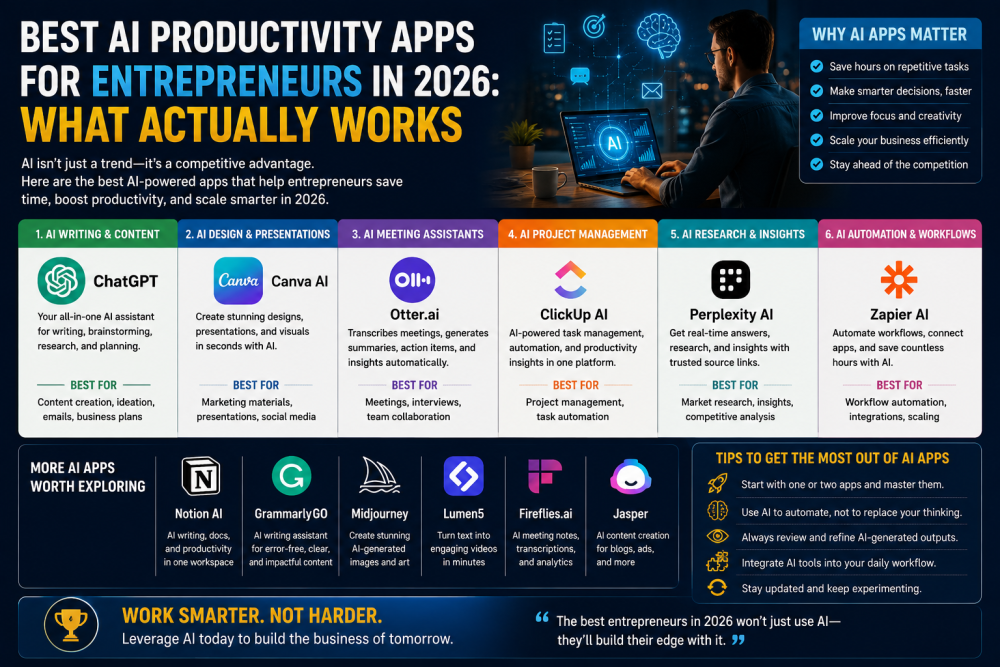
There's no shortage of lists telling you which AI tools to use. Most of them read like a product catalogue—feature bullets, pricing tiers, and some screenshots. What entrepreneurs actually need is a cleaner answer to a simpler question: where does AI genuinely save time, and where does it just add another subscription to manage?
The honest answer in 2026 is that AI productivity tools have moved past the experimental stage. The US Chamber of Commerce reports that 58% of small businesses now use generative AI, up from 40% in 2024 and 23% in 2023. The tools that have earned real adoption are the ones that solve specific, painful problems rather than promising general intelligence.
This guide is organized by problem rather than by product. Figure out which pain point matches your situation, and the right tool follows.
The Problem: You're in Back-to-Back Meetings and Losing Track of Everything
Best tool: Fireflies AI
If you're running a business that runs on calls—sales demos, client check-ins, team standups, investor conversations—Fireflies is one of those tools that earns its subscription the first week you use it. It joins your meetings as an observer, records everything, generates a full transcript, extracts action items, highlights key moments, and distributes summaries to whoever needs them.
The version of Fireflies in 2026 is considerably better than even the 2024 version. The action item extraction is specific rather than generic—it identifies who committed to what, not just that a commitment was made. The searchable meeting archive means you can pull up what was discussed in a client call six months ago without digging through email threads.
Who it's for: Any founder or entrepreneur whose days are significantly structured around calls and whose biggest operational frustration is that nothing from those calls makes it into written form consistently.
The caveat: Fireflies works best when meetings have some structure. If your calls tend to ramble or involve a lot of whiteboarding, the AI summaries can miss nuance. Always scan the output before acting on the extracted action items.
Pricing: Free tier available for limited meetings. Pro, at around $10/month per seat, covers the core use case for most solo founders. The business tier adds advanced analytics and CRM integrations.
The Problem: Research Takes Half a Day When It Should Take an Hour
Best tool: Perplexity
Entrepreneurs spend enormous amounts of time on research—competitive analysis, industry background, quick fact-checks before a client meeting, understanding a regulation, and looking up a potential partner's business history. The traditional model is Google something, open fifteen tabs, read twelve articles, and triangulate an answer.
Perplexity is a research assistant that delivers sourced, synthesized answers rather than a list of links. It pulls from dozens of sources per query, shows you where each piece of information came from, and answers in plain prose. The average query returns citations from around 42 sources synthesised into a coherent answer. You can push deeper with follow-up questions in the same thread.
For entrepreneurs, the best use cases are the high-frequency, medium-depth research tasks that don't need a full analyst but can't be answered by a single Google search: "What are the main regulatory requirements for launching a financial services product in the UK?" or "How is competitor X positioning its enterprise product differently from six months ago?" Perplexity handles these better than anything else available.
The limitation to know is Perplexity is excellent for synthesising existing public information. It's not the right tool for proprietary data analysis, complex document review, or tasks that require sustained reasoning over long contexts. For those, you need something like Claude.
Pricing: Free tier handles most research queries adequately. Pro at $20/month adds faster responses, more sources per query, and access to better underlying models.
The Problem: Your Calendar Is a Mess and You Never Have Time for Deep Work
Best tool: Motion
If you've ever ended a week feeling vaguely productive but unable to account for where the time went, Motion addresses the problem at the scheduling level rather than the task level. It combines your calendar, task list, and project deadlines and then uses AI to automatically schedule your work—figuring out when in your calendar each task fits based on deadlines, priority, and meeting commitments.
The distinctive thing about Motion is that it doesn't just show you what's on your plate—it builds a schedule and updates it dynamically when things change. If a meeting gets added in the middle of your day, Motion doesn't just note the conflict; it rearranges the rest of the day to protect your highest-priority work.
For entrepreneurs who struggle with context-switching and the feeling that reactive work is always crowding out strategic work, Motion provides a structural intervention rather than just another reminder system. It forces priority-setting at the input stage rather than letting everything become urgent.
The caveat: Motion works best when you commit to it as your primary scheduling system. Treat it as a supplement to your existing calendar, and it loses much of its value. Users who get the most out of it are those willing to run their entire day through it.
Pricing: Pro AI at $19/seat/month (annual) includes AI scheduling, calendar integration, and task planning. Seven-day free trial available.
The Problem: You're Writing Everything From Scratch When AI Could Do the First Draft
Best tools: Claude and Grammarly
Most entrepreneurs spend more time writing than they'd like to admit—emails, proposals, investor updates, marketing copy, terms and conditions, job descriptions, meeting agendas, and board reports. The blank-page problem is real and time-consuming.
Claude (from Anthropic) has become a go-to for entrepreneurs who need to think through complex problems in writing, draft long-form content, summarize lengthy documents, or work through detailed business writing. Its ability to handle very long context—hundreds of thousands of tokens—means you can feed it a 50-page document and ask it to extract the five most important points, or give it a long email thread and ask for a sharp summary. It handles nuance and tone well, and it's notably good at professional writing that doesn't sound AI-generated.
Grammarly operates at a different level—it's the tool you use to polish and refine rather than generate. The 2026 version has moved well beyond grammar checking into full writing improvement: tone adjustment, clarity suggestions, conciseness coaching, and in-document rewriting. It integrates into email clients, Google Docs, and most writing environments, which means it works where you're already writing rather than requiring you to switch tools.
The combination that works for most entrepreneurs: use Claude (or another LLM) for the first draft and the heavy thinking work, then use Grammarly for the final editing pass.
Pricing: Claude has a free tier; Pro at $20/month unlocks more powerful models and higher usage limits. Grammarly's free tier handles the basics; Pro, at approximately $12/month, adds the full writing coaching suite.
The Problem: Repetitive Manual Work Is Eating Time You Can't Get Back
Best tool: Zapier
Zapier is not strictly a 2026 tool — it's been around for years. But its recent additions make it meaningfully more powerful for entrepreneurs, and it earns its place on this list because the problem it solves (automating the repetitive handoffs between your tools) is one of the most consistently expensive time drains in any small operation.
The core concept: connect thousands of apps through automated workflows called Zaps. When something happens in App A, Zapier triggers an action in App B — without you doing anything. New lead in your form → automatically added to your CRM → notification sent in Slack → task created in your project management tool. That chain might have taken you five minutes manually, ten times a day: that's 50 minutes daily, over 200 hours a year.
What's newer in 2026 is Zapier's AI-powered Copilot, which builds automations through conversation rather than clicking through configuration screens. You describe what you want—"When I get a new email from a client, create a task in Asana and summarize the email"—and Copilot builds the Zap. This has reduced the setup barrier significantly for non-technical entrepreneurs who found previous Zapier configuration fiddly.
Pricing: Free tier covers 100 tasks/month with 2-step automations — enough to test use cases but typically runs out in the first week of real use. Paid plans start around $20/month and scale with usage volume.
The Problem: Your Visual Content Looks Amateurish But You Can't Afford a Designer
Best tool: Canva with AI (Magic Studio)
Canva has become a different product with its AI integrations. Magic Studio transforms rough text prompts into social media posts, presentation decks, marketing materials, and branded content at a quality level that would have required a junior designer two or three years ago.
The specific capability that matters most for entrepreneurs in 2026 is brand consistency at scale. Canva's AI features learn your brand colors, fonts, and style preferences and apply them automatically across new content. Instead of starting from a template and manually adjusting every element to match your brand, you start from a description, and the AI produces something on-brand as a first draft.
For entrepreneurs who handle their own marketing, product, and sales materials, this is one of the highest-ROI tools in the stack. The alternative — outsourcing design work — is expensive and slow. The previous alternative — doing it yourself without strong design skills — produced output that looked exactly like that.
Pricing: Free tier includes thousands of templates and core design tools. Pro, at approximately $13/month per person, adds the full AI suite, background removal, brand kit features, and content scheduler.
The Problem: You're Building Something Custom and Can't Justify Developer Costs
Best tool: Lovable (or similar no-code AI builders)
This category is newer and perhaps more transformative than the others. No-code AI builders—Lovable being the most capable in 2026—let you describe a custom application you want and receive working code for a full-stack web application: frontend UI, backend databases, authentication systems, and deployment infrastructure.
For entrepreneurs who have a specific tool they want to build — a client portal, an internal dashboard, a simple customer-facing app — but can't justify the cost of a developer, this changes the calculus entirely. Gartner predicts 70% of new enterprise applications will use no-code/low-code technologies, and organizations are achieving up to 90% reduction in development time compared to traditional methods.
The honest caveat: the output from these tools works well for relatively straightforward applications. Complex enterprise software, unusual integrations, or performance-critical systems still need experienced developers. But for the class of tools that most small businesses actually need—a form that feeds a database, a dashboard that visualizes CRM data, a simple booking system—Lovable and its peers can produce working software in hours rather than weeks.
Pricing: Lovable Pro at $25/month includes 100 credits/month, private projects, and code export. Business at $50/month adds SSO and advanced controls.
The Problem: Your Knowledge Is Scattered Across Notes, Emails, and Documents
Best tool: Notion AI
Notion has become many entrepreneurs' central operating system precisely because it pulls together what used to live in five different places—meeting notes, project documentation, team wikis, personal notes, client information, and SOPs. The AI layer on top of this creates something genuinely useful: a system that can answer questions about your own business.
In practice this means "What did we decide about the pricing model in the Q1 planning session?" gets you a synthesized answer from your meeting notes rather than a trip to the search bar and fifteen minutes of re-reading. "Turn these bullet points into an SOP" produces a formatted, actionable document. "Summarize the last ten updates on this project" compresses context-switching overhead significantly.
The value of Notion AI increases with the amount of your business's knowledge that lives in Notion. For teams that have committed to centralizing their documentation there, it becomes a searchable institutional memory that new team members can query rather than needing to ask you directly.
Pricing: Notion's free tier is generous for individual use. The AI features are on the paid plans starting around $8/month per member plus $8/month for the AI add-on.
Putting It Together: A Practical Stack
The most common mistake entrepreneurs make with productivity tools is adopting too many at once and letting them compound each other's complexity. A tool that saves time is only useful if you actually use it consistently, and consistency drops sharply when you're managing eight new tools simultaneously.
A practical entry point for most entrepreneurs in 2026:
Start with one AI writing tool (Claude for substantive work, Grammarly for polishing) and run everything through it for a month. The time savings and output quality improvement will become obvious quickly.
Add an automation layer (Zapier) once you've identified two or three manual handoffs in your workflow that happen more than five times a week. These are your best automation candidates.
Then evaluate the specialist tools—Fireflies if meetings are a major part of your day, Perplexity if research is, and Canva if visual content production is a bottleneck.
The best AI productivity tools fit your specific workflow rather than forcing you to adapt. They have low learning curves that deliver value within days rather than months. They work alongside your existing systems rather than replacing them entirely. That framing is actually useful: the goal isn't to use the most AI tools; it's to use the right ones for your actual bottlenecks.