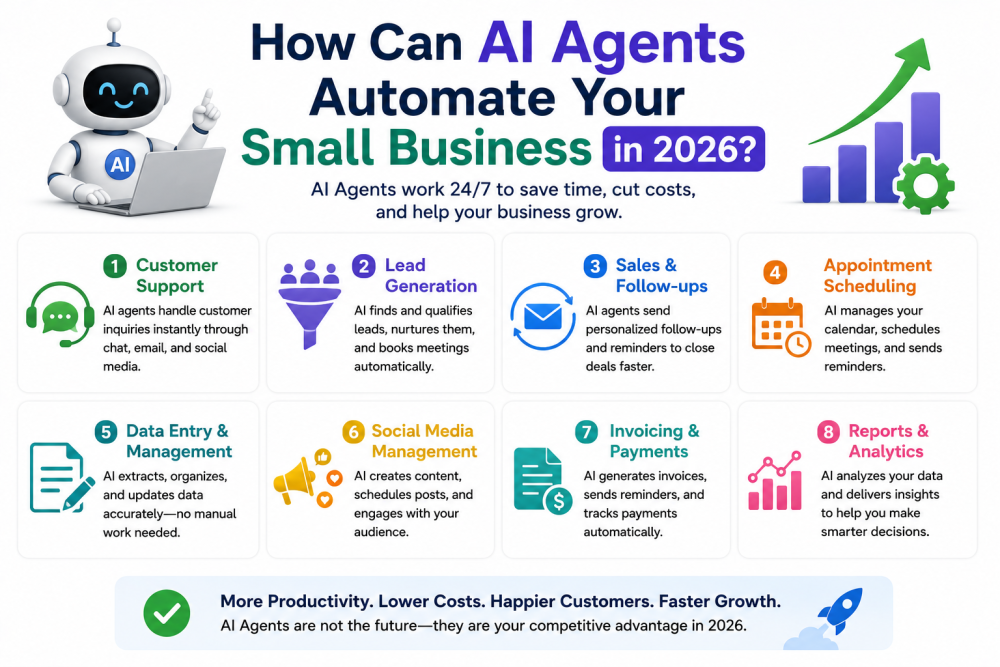
An AI agent, stripped of the conference-stage fog, is software that doesn't just answer you, it does things. A chatbot tells you how to chase an overdue invoice. An agent finds the overdue invoices, drafts the chasers in your tone, sends them on your schedule, and logs who paid. That difference, answering versus doing, is the whole story of business AI in 2026, and it's why "agents" went from buzzword to actual line item in small business budgets this year.
Here's what this article is and isn't. It is a plain map of what agents genuinely automate for a small business right now, where to start, what it costs, and the guardrails that keep an eager robot from emailing your best client something unfortunate. It isn't a promise that software runs your company while you fish. The businesses getting real value from agents in 2026 automated specific, boring, repeated workflows, one at a time, with a human still holding the important pens. The ones that got burned believed a demo.
What Agents Can Actually Do Now
The honest capability list, sorted by how reliably it works in the wild.
Customer service is the mature one. Support agents like Intercom's Fin and its rivals read your help docs and past tickets, then genuinely resolve a large share of routine questions, where's my order, how do returns work, can I reschedule, on their own, around the clock, escalating the rest to you. This category has years of production mileage now, pricing is per-resolution or per-seat, and for any business drowning in repetitive messages it's the closest thing to a sure bet on this list.
Inbox and admin triage is the fastest-growing one. Modern assistants, Claude, ChatGPT, Gemini, and the tools built on them, now plug into email, calendars, and documents to do the connective-tissue work: drafting replies for your approval, summarizing the thread you've been avoiding, scheduling the meeting after three rounds of "how's Tuesday," pulling the numbers from receipts into the spreadsheet. Individually tiny. Collectively, for most owners, an hour-plus a day, which is the metric that matters.
Workflow automation grew a brain. The Zapier-style plumbing that once needed exact rules now takes plain-English instructions and handles the fuzzy middle: when an order comes in, check it, invoice it, update the sheet, notify the group chat, and flag anything weird for a human. "Flag anything weird" is the part that wasn't possible three years ago, and it's quietly the biggest upgrade on this list.
Bookkeeping and invoice chasing work well inside the tools you already use, QuickBooks, Xero and friends have woven agents through categorization, reconciliation, and polite automated payment reminders, which is the single automation with the most direct cash-flow payoff for service businesses.
And computer-use agents, the ones that operate a browser like a person, clicking, filling forms, navigating sites, are the frontier: genuinely useful for research, data gathering, and form-heavy chores, still the category where you supervise closely and expect the occasional face-plant. Improving fast. Not yet "set and forget." Anyone who tells you otherwise is selling a course.
Where to Start: One Workflow, Not a Transformation
The failure mode I've watched repeatedly: a business owner sees the vision, buys four tools, wires up nothing properly, cancels everything by month two. The success pattern is duller and universal, so here it is as a recipe.
Write down your week's repeated tasks, the ones you do more than three times, and circle the one that's most annoying, most rule-based, and least catastrophic if botched. That's your first agent. For most service businesses it's answering the same ten customer questions; for e-commerce, order status and returns; for anyone who invoices, the chasing; for the chronically scheduled, the calendar tennis.
Then automate that one workflow, run it with training wheels, agent drafts, human approves, for two to four weeks, and read every output. You're learning its failure patterns, and it's learning your business, in the sense that you're refining its instructions every time it does something clumsy. Only when boring, and boring is the goal, do you remove the approval step for the low-stakes cases, and only then do you pick workflow number two.
Cost reality, since the vendors won't lead with it: a useful starter setup, one assistant subscription plus one automation or support tool, runs $30 to $100 a month for most small businesses. Per-resolution support pricing scales with your volume. The four-figure "AI transformation" packages being sold to small businesses right now are, with rare exceptions, the same tools plus a markup and a slide deck.
The Guardrails, Which Are Not Optional
Agents act, and things that act can act wrong, so the rules experienced operators converge on:
Human approval on anything involving money or external communication, at least until months of clean history say otherwise, and permanently for anything large. An agent that drafts is an asset; an agent that sends unsupervised is a liability you've chosen.
Least privilege, the boring security principle that matters double here: the agent gets access to exactly what its job needs, its own logins where possible, and nothing else. No agent needs your banking password to sort your inbox. None. Ever.
Check the work, on a schedule, forever, spot-checks weekly even after trust is earned, because agents fail quietly and confidently, a mislabeled invoice or a wrong answer to a customer doesn't announce itself. And keep the data rules in view: use business tiers where your data isn't training material, and don't feed customer personal information into consumer-grade tools, your customers' trust and, in many places, the law both care.
None of this is fear. It's the same posture you'd take with a smart, fast, tireless new hire who occasionally, without warning, invents things. Because that's what you've employed.
What This Looks Like by Business Type
To make it concrete. A salon or clinic: booking agent handles the scheduling and reminders, support agent answers the twenty standard questions, owner reclaims their evenings from Instagram DMs. An online store: order-status and returns resolved automatically, review requests sequenced, inventory oddities flagged to a human. A freelancer or agency: inbox triage, proposal first-drafts from a template, invoice chasing running politely in the background, research agents assembling briefs. A trades business: quote follow-ups, the single highest-leverage automation in that industry, appointment confirmations, and supplier price checks via a browsing agent while you're on the tools.
Different businesses, same shape: the agent eats the repetition, the human keeps the judgment, the relationships, and the craft. That division isn't a limitation of 2026's technology. It's the design.
The Bottom Line
AI agents in 2026 automate the connective tissue of a small business, support answers, inbox triage, scheduling, invoice chasing, workflow plumbing, and do it for tens of dollars a month, not thousands. The playbook that works is unheroic: one workflow, training wheels on, approval gates on money and outbound messages, spot-checks forever, then the next workflow. The version being sold on stage, the autonomous business that runs itself, remains a demo.
Somewhere between those two is a very real prize: five to ten hours of your week, returned. For most owners that's not efficiency trivia, it's the difference between working in the business and working on it, which is the oldest advice in the small business world, finally with a staff to delegate to.
FAQs: AI Agents for Small Business
What's the difference between an AI agent and a chatbot?
A chatbot answers; an agent acts. Agents connect to your actual tools, email, calendar, store, accounting software, and complete tasks: sending the follow-up, booking the slot, chasing the invoice, resolving the support ticket. The practical line: if it only produces text for you to use, it's a chatbot; if the task ends up done, it's an agent.
What's the best first task to automate with an AI agent?
The most repeated, most rule-based, least dangerous one, which for most businesses is either routine customer questions or invoice chasing. Both have mature tools, obvious success measures, and low blast radius when something's clumsy. Automate it with human approval for a few weeks before trusting it solo, then move to the next task.
How much do AI agents cost for a small business in 2026?
A genuinely useful starter stack, one AI assistant plus one support or automation tool, runs roughly $30 to $100 a month, with customer-support agents often priced per resolved conversation, around a dollar each. Costs scale with volume, not ambition. Be skeptical of four-figure "AI transformation" packages; they're usually these same tools with a consulting markup.
Can AI agents run my business without me?
No, and the businesses that treat them that way supply the cautionary tales. Agents in 2026 excel at bounded, repeated workflows under light supervision and fail quietly when left truly alone, wrong answers delivered confidently, edge cases mishandled. The working model is delegation with checks, the same as any capable junior hire, not absence.
Are AI agents safe to connect to my email and accounts?
Safe enough with the right posture: business-tier tools whose terms exclude your data from training, minimum necessary permissions per agent, approval gates on outbound messages and anything touching money, and weekly spot-checks that never fully stop. The risk isn't malice, it's confident error, and the guardrails exist to catch exactly that cheaply.
Will AI agents replace my employees?
In small businesses the observed pattern is different: agents absorb the repetitive layer, the same questions, the chasing, the scheduling, and the humans move up to judgment, relationships, and the work customers actually pay for. Owners typically reclaim hours rather than cut heads, and the businesses that use those hours on growth outperform the ones that bank them as savings.