A friend of mine runs a small landscaping company—just her, two part-time guys, and a truck that's seen better days. Last year she was drowning in admin work: missed calls turning into missed jobs, invoices she'd forget to send for weeks, and a Saturday morning ritual of replying to the same five customer questions over and over. This year, an AI scheduling tool and a simple chatbot on her website handle most of that. She didn't hire anyone. She just stopped doing the boring parts herself.
That's basically the story of AI for small business right now. It's less about some sci-fi transformation and more about quietly removing the stuff that used to eat your evenings. The tools have gotten genuinely good, genuinely cheap, and—maybe most importantly—genuinely easy to set up without an IT department.
So let's go through what's actually worth using in 2026, organized by the kind of problem each one solves. I'll be honest about the catches too, because every tool here has one.
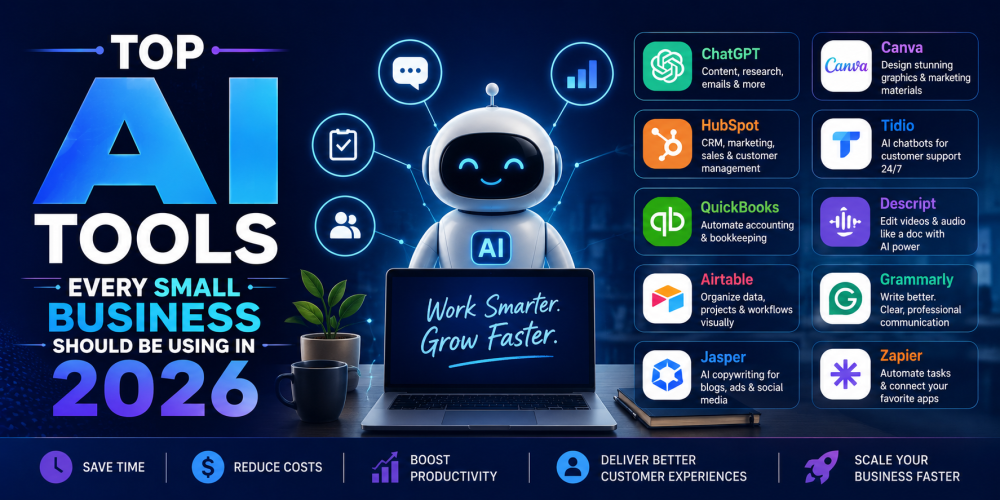
Content Creation: ChatGPT and Jasper
If you do nothing else from this list, start here. Content creation is where most small business owners feel the squeeze—you know you need blog posts, social captions, email newsletters, and product descriptions, and somehow none of it ever gets written because there's always something more urgent.
ChatGPT remains the all-purpose workhorse. It drafts emails, brainstorms marketing angles, summarizes long documents, and can talk you through almost any business question you'd otherwise Google for an hour. The trick with ChatGPT isn't the tool itself—it's learning to give it context. "Write a social post about our new product" gets you generic mush. Write a casual Instagram caption for our new lavender candle, aimed at people who follow home décor accounts. Mention it's hand-poured in small batches to get you something usable.
Jasper is built specifically for marketing content and trains on your brand voice. You feed it information about your business once, and it generates blog drafts, ad copy, and email campaigns that sound more consistently "you" than a general chatbot would. Is the output perfect? No. It's good enough to edit, which is faster than starting from scratch. Think of it as a fast first-draft writer, not a replacement for your judgment.
Real-world tip: if you're spending more than a few hours a week writing content, either of these tools can realistically cut that time in half. Not eliminate it—half. The editing step still matters.
Design Without a Designer: Canva Magic Studio
Canva has been around forever, but its AI features have quietly become one of the highest-value tools for small businesses that don't have a design budget. Magic Studio lets you generate social graphics, resize designs across platforms automatically, remove backgrounds, and even create short video content—all without needing to know what a "bleed" or a "kerning" is.
I've seen small retail shops use this to keep their Instagram looking professional with maybe 20 minutes of work a week. The templates do a lot of the heavy lifting, and the AI suggestions for layout and color tend to be more "tasteful default" than "creative genius," which honestly is exactly what most small businesses need. You're not trying to win a design award—you're trying to look consistent and put-together.
Customer Service That Doesn't Sleep
This is probably the category that's changed the most in the last couple of years. AI customer service has gone from "annoying chatbot that can't answer anything" to genuinely handling a meaningful chunk of routine questions.
Tidio (and its AI layer, Lyro) is a popular pick for e-commerce and service businesses. It sits on your website and handles FAQs, order status questions, and basic troubleshooting around the clock. The honest reality check: autonomous resolution rates for overall service cases sit closer to 30–50% today, though for well-structured, routine queries, rates can reach 70–90% in top programs. Translation—it won't solve everything, but for the "what are your hours" and "where's my order" questions, it's genuinely useful.
My AI Front Desk takes this further by acting almost like a virtual receptionist—answering calls, texting customers back, booking appointments, and updating your CRM. Reception used to be about answering phones; now it means an AI system handling calls, texts, CRM updates, appointments, and follow-ups before you even realize there's something to follow up on. For a solo service business owner (think: a chiropractor, a small salon, a contractor), this can mean the difference between a missed call costing you a customer and that customer getting booked automatically while you're literally elbow-deep in a job.
Chatbase is worth mentioning if you want an AI agent that actually does things, not just chats. It can check payment status, pull order info from Shopify, create support tickets, and process basic refund requests—connecting to the systems you already use rather than living in its own bubble.
The catch with all of these: setup quality matters a lot. An AI agent trained on five outdated FAQ pages will give five outdated answers, confidently. Plan to spend a few hours getting the knowledge base right, and then revisit it every few months.
Scheduling and Time Management: Motion and Reclaim.ai
If you've ever spent twenty minutes going back and forth over email trying to find a meeting time, you already know why this category exists.
Motion acts like an AI calendar assistant—it looks at your tasks, deadlines, and existing commitments, then automatically slots things into your day in a way that (mostly) makes sense. Think of it as a personal assistant, but one that doesn't need coffee breaks or complain about overtime. It's particularly useful if you're the kind of business owner who's constantly context-switching between client work, admin, and actual operations—Motion tries to protect blocks of focused time instead of letting your calendar turn into a patchwork of 15-minute fires.
Reclaim.ai does something similar but leans more into syncing across calendars and automatically defending time for recurring priorities—like, say, making sure "review weekly numbers" doesn't get bumped every single week because something else feels more urgent.
Neither of these is magic. They both work best when you're at least somewhat disciplined about putting your commitments into a calendar in the first place. "Garbage in, garbage out" still applies.
Bookkeeping and Accounting: QuickBooks AI, Wave, and the New Wave of AI-First Tools
Bookkeeping is the chore nobody wants to do, which is exactly why AI has made such a dent here.
QuickBooks has leaned hard into AI features—automatically categorizing transactions, generating financial reports, and flagging anomalies that might indicate an error or a missed deduction. Its AI can learn to categorize your transactions, saving hours of manual data entry each month. If you're already in the QuickBooks ecosystem, these features are mostly just there waiting for you to turn them on.
Wave is worth a look if you're a freelancer or very small operation—it offers solid accounting, invoicing, and receipt scanning without a monthly subscription fee, and its AI handles a lot of the categorization grunt work automatically.
For businesses that want to go further, there's a newer crop of AI-first bookkeeping platforms—tools like Zeni and Docyt—that essentially function as an AI bookkeeper layered with human oversight. Docyt's AI accountant combines a chatbot with process automation to reconcile accounts and write reports automatically, which can be a real time-saver if your books have gotten messy and you don't want to hire a full-time bookkeeper just yet.
A word of caution here: AI bookkeeping tools are great at the mechanical stuff—categorizing, reconciling, flagging—but they're not a substitute for an accountant when it comes to taxes, especially as your business grows. Use AI to keep your books clean day-to-day; still get a human to look at the bigger picture at least once a year.
CRM and Sales: HubSpot and folk
If you're juggling customer relationships across email, spreadsheets, and your own memory, this category alone can be transformative.
HubSpot has become one of the standard choices for small businesses wanting AI-powered CRM, sales, and marketing in one place. Its AI features help draft follow-up emails, score leads based on engagement, and automatically log interactions so nothing falls through the cracks. The free tier is genuinely usable, which matters a lot when you're not sure yet how deep you want to go.
Folk takes a slightly different approach—it's an AI-first CRM built for small teams that unifies contacts, email, WhatsApp conversations, and LinkedIn capture in one place to keep your pipeline current and searchable. If a lot of your customer relationships happen outside of traditional email—WhatsApp, LinkedIn DMs, that sort of thing—this is worth a look specifically because most CRMs still treat those channels as an afterthought.
Here's a scenario that'll feel familiar: you meet someone at a trade show, exchange numbers, text back and forth a few times, and then... nothing. Three months later you can't remember their name, let alone what you talked about. A decent AI-powered CRM catches that conversation, logs it, and reminds you to follow up before the lead goes cold. It's not glamorous, but it's the difference between a pipeline and a pile of business cards in a drawer.
Tying It All Together: Zapier (with AI Steps)
Once you've picked up a few of these tools, the next problem is making them talk to each other. This is where Zapier earns its keep.
Zapier connects your stack so a small team can move data without copying and pasting—building multi-step workflows, adding AI steps for enrichment or drafting, and routing leads or tickets automatically. Its AI Copilot feature can help you build these automations even if you're not technically inclined, which removes a big barrier that used to require either a developer or a lot of trial and error.
A simple example: a new lead fills out your contact form → Zapier triggers an AI step to draft a personalized welcome email based on what they entered → the lead gets added to your CRM → you get a Slack notification. All of that, set up once, running in the background forever. The one thing to watch is that task-based billing needs monitoring as your usage grows—it's easy to set up five or six automations and not notice your monthly bill creeping up until you check it.
Data and Decision-Making: Tableau
This one's a bit more advanced, but worth knowing about as your business grows past the "I can keep it all in my head" stage. Tableau's AI-powered dashboards show you what's working, what's changing, and where you need to act, turning raw sales and performance data into something you can actually glance at and understand.
For a small online store, this might mean spotting that a particular product is selling unusually well in one region a full week before you'd have noticed it manually—giving you time to adjust inventory or marketing before you either run out or miss the trend entirely.
It's probably not the first tool on this list you reach for. But once you've got a few months of consistent sales and customer data flowing in, it starts paying for itself in better decisions rather than time saved.
How to Actually Pick (Without Wasting Money)
Here's the part that gets glossed over in most of these lists: you don't need all of this. Picking five tools at once is how you end up paying for five subscriptions you barely use and forget which one does what.
A better approach—pick one or two tools that solve your biggest current headache, not your theoretical future one. Before you commit, decide what you're measuring: hours saved per week, replies sent, leads followed up on, whatever's relevant. Track that number for two weeks before you start using the tool, then again after a month of actually using it. If the tool doesn't clearly move that number, downgrade or cancel it instead of hoping it'll pay off later.
This sounds obvious, but most people skip it—they sign up, use a tool for a week, get distracted, and then six months later realize they've been paying $30 a month for something they haven't opened since March.
Where This Actually Leaves You
None of these tools are going to run your business for you, and anyone who tells you otherwise is selling something. What they will do—if you pick a couple that match your actual bottlenecks—is buy back hours that used to disappear into admin work.
For my landscaping-business friend, that meant getting her Saturday mornings back. For someone else, it might mean finally sending invoices on time or not losing leads because nobody got around to following up. The specific win looks different for every business, but the underlying shift is the same: less time on the stuff that keeps your business running, more time on the stuff that actually grows it.
Start small. Pick the headache that annoys you the most. Try one tool for a month. If it works, build from there. If it doesn't, you're out a month's subscription, not a year's commitment—and now you know a little more about what you actually need.